Using illustrations
Overview
We have created a variety of assets that you can download to enhance ease of use, including PowerPoint templates with a range of pre-added illustrations to meet your needs.
Visual elements
We use a variety of illustration styles to support and enhance our communication, each tailored to different contexts and purposes.
Icons
Our icon library offers a wide selection of simplified, symbolic representations covering diverse topics and themes. Each icon is custom-designed by our Graphic Design team to ensure clarity and consistency.
Where more sensitive topics are being presented, icons would be best to use as supporting imagery over illustrations.
Head to our Iconography page (opens in a new tab) in the Service Manual to find out more.

Spot illustrations
Our spot illustrations are compact visuals made up of one or more individual illustrated elements, which can stand alone or be positioned within (or in front of) a circle. Designed to highlight a specific topic, each spot illustration has a clear focal point that directly relates to the content. These visuals are supporting elements, enhancing social media graphics, presentations, and printed materials by adding visual interest and helping to capture the audience's attention.

Scenic illustrations
These illustrations depict towns, cities, and villages, incorporating elements like skylines, buildings, trees, and people in the foreground. They effectively set the scene and introduce visual storytelling, helping to contextualise a range of topics and themes. We frequently use these scenes as banners in our digital products and articles to enhance engagement and bring content to life.

For more guidance about where we use our illustrations on the ONS website, head to the Multi-media content guidance page (opens in a new tab) in the Content style guide
Using visual elements
- Always use only the officially downloaded illustrations and icons.
- Avoid combining or overlaying downloaded illustrations and icons.
- Never add text over illustrations.
- Do not stretch, alter, or scale images to fit busy layouts.
- Ensure that the style of the illustration aligns with the tone of your content.
- Do not use illustrations as logos, headers, or avatars.
- Never rely solely on imagery—use it to complement and support text.
- Ensure the illustration’s colours align with the category or theme of your content.
If you need specific illustrations that aren’t already available then please fill in our design request form (opens in a new tab)
Presentations
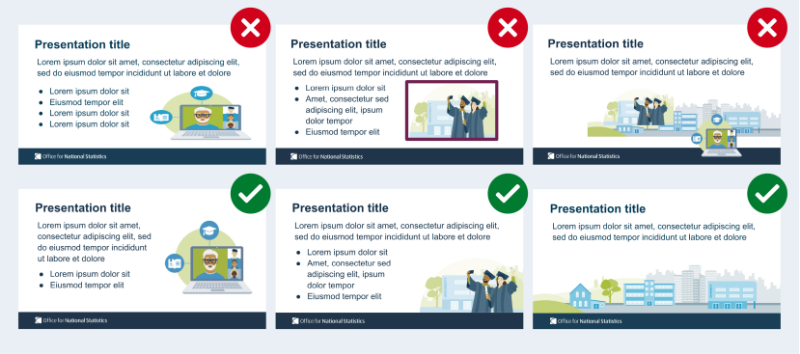
Illustrations can greatly enhance your PowerPoint presentations by making your content more engaging, clear, and visually appealing. However, to maintain clarity and professionalism, it’s important to use them thoughtfully and in a way that complements your key messages, following the guidance from the list above.
Illustrations should complement your content, not act as a distraction. Avoid using them on every slide—too much imagery can clutter your presentation and dilute the impact. For data-heavy slides, consider using illustrations sparingly, if at all, to avoid overwhelming the audience.
For slides that already contain a lot of text or data visualisations, avoid adding additional imagery. Illustrations work best on welcome, title, and closing slides, as well as those with simple bullet points or key statements.
We have created a variety of assets that you can download to enhance ease of use, including PowerPoint templates with a range of pre-added illustrations to meet your needs.
Social media
Illustrations on ONS social media should be engaging and informative, helping to visually communicate data and key messages in a clear and accessible way. Use illustrations to simplify complex information, enhance data visualisations, and make content more relatable to a wide audience.
When designing social media graphics, ensure that illustrations align with the ONS brand, are relevant to the content, and support the message without overwhelming the viewer. Stick to simplified, easily recognisable visuals that complement the tone of the post and engage viewers effectively. Always ensure that illustrations are easy to understand at a glance and enhance the overall clarity of the message.
Head to our Social media design guidelines page (opens in a new tab) for more information about creating graphics for our social platforms.