For designers Creating buildings
Overview

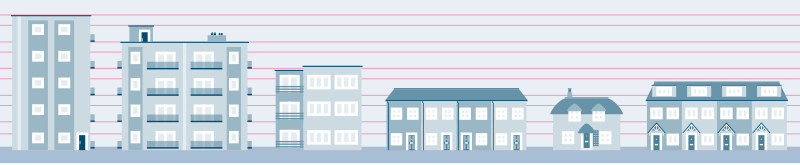
When creating new elements like buildings and vehicles, it's essential to maintain consistency in both look and scale to ensure everything fits cohesively. Buildings in our style are constructed using a mix of rounded pixel shapes and line weights. To ensure a sense realism and represent diverse communities accurately, always use real-world photos of buildings and homes as reference points.
Constructing buildings
1. Use the Master File
All buildings must be created within the Master Buildings Illustrator file (located in the shared Google Drive). This ensures consistency across all assets.
2. Windows and Doors
- Copy and paste existing windows and doors for consistent scaling and line weight.
- If custom windows or doors are needed, reuse existing elements and align them using the guides to maintain correct scale and line weight (2.5px stroke weight).
- Standard door dimensions:
- Single doors: 30px height x 16px width
- Double doors: 30px height x 32px width
3. Building Structure
- Use simple rectangles for the building structure. Keep dimensions in round pixels to ensure smooth alignment.
- To create depth, layer shapes as needed.
- For buildings with multiple floors, ensure the spacing between floors is consistent with the grid height in the master file (19px between floors).
4. Roof and Additional Details
- Reuse existing roof shapes, chimneys, and other details for consistency.
- Flat roofs should be 2px high with a 2px overhang on each end of the building.
- Simplicity is key—avoid overcomplicating elements.
Saving buildings as assets
Once your building illustrations are complete and ready for use, follow these steps for saving and organising:
- Keep the original version of the building in the master file for future reference.
- Create a new Illustrator file for the building, and paste the building illustration in.
- Outline all strokes in the asset before saving to ensure consistency and prevent issues when reusing the asset.
- Save to the CC Library and Google Drive using the guidance in the Saving Assets section.